The dream: one agent that follows you everywhere
You’ve probably pictured it: one assistant that sits across your calendar, inbox, docs, chat, CRM, and tickets, quietly keeping everything in sync. You ask for “a clean weekly plan,” and it schedules focus time, drafts the update, pulls the right links, and nudges the right people—without you hunting through tabs or re-explaining context. For product-minded teams, the appeal is obvious: fewer handoffs, less copy‑paste, faster follow-through, and a single place to delegate routine work.
The problem is that “everywhere” sounds simpler than it is. The moment an agent can read and write across systems, you inherit the same messy realities you already manage with humans: who is allowed to see what, which source is authoritative, how changes are audited, and what happens when the agent guesses wrong. Even lightweight tasks—like “move that meeting” or “send the follow-up”—can become expensive if the assistant touches the wrong customer, shares a private doc, or updates a record you can’t easily unwind.
So the useful version of the dream isn’t magic autonomy; it’s scoped delegation. A cross-app agent is most valuable when you can be specific about its job, its allowed tools, and its stopping points—what it may draft versus what it may send, what it may suggest versus what it may change. The rest of this article draws the practical lines that turn “one agent everywhere” from a slogan into something you can safely trial and, just as importantly, confidently limit.
What “many apps” actually means in your daily workflow
“Many apps” usually isn’t five icons on your dock. It’s the same work artifact existing in multiple places: a decision in Slack, a task in Jira or Asana, supporting notes in a doc, a follow-up in email, and customer context in Salesforce or HubSpot. The friction comes from translation—turning a message into a ticket, turning a ticket into a status update, turning a meeting into action items—and from small mismatches like different titles, owners, or due dates across systems.
That’s where cross-app agents sound compelling: they promise to carry intent across boundaries so you don’t retype the same thing three times. But the reality of “many apps” also includes shared inboxes, delegated calendars, multiple workspaces, and half-migrated tools. Those aren’t edge cases; they’re the default, and they’re where an agent can quietly do the wrong “correct” thing.
Where a single agent works: shared context and repeatable tasks
Advertisement
A single cross-app agent earns its keep when the work is mostly “same steps, different inputs,” and the information it needs is stable enough to reuse. Think weekly status churn: pull open tickets from the tracker, match them to a doc template, draft a concise update, and attach the right links. Or meeting follow-through: capture decisions from notes, turn them into tasks with owners and dates, then draft the follow-up message. In these cases, the agent isn’t “thinking like a PM.” It’s moving consistent context—project names, owners, goals, and definitions—across systems so you don’t rebuild the picture every time.
The best candidates share three traits: a clear source of truth (one system wins when data conflicts), a repeatable output format (the same sections, fields, or checklist every time), and a review step before anything irreversible happens. You still pay a setup cost: agreeing on templates, naming conventions, and where decisions live. Without that, the agent mostly automates confusion at a higher speed.
The first hard boundary: permissions, identities, and least privilege
You feel the permissions problem the first time you try to “just connect everything.” The agent either runs as you (and suddenly your personal access becomes a shared automation surface), or it runs as a service identity (and now you need to decide what that identity can see and do across each app). Either way, cross-app delegation turns into access design: which workspace, which folder, which project, which customer account, which inbox, which calendar.
Least privilege is the difference between a helpful assistant and an incident waiting to happen. If the agent only needs to draft a QBR email, don’t give it send rights. If it only needs to read a subset of tickets, don’t grant org-wide CRM access. Many tools make fine-grained permissions hard, inconsistent, or expensive to manage, and connectors often default to broad scopes. Plan for separate identities per environment, short-lived tokens where possible, and a clear audit trail of what the agent touched and under which user.
Context boundaries: what the agent should not remember
Advertisement

You’ll also run into a quieter boundary: not everything the agent sees should become “remembered context.” If it reads a thread about a reorg, a customer escalation, or a salary band, that information can be useful for a single task and dangerous as a long-lived memory. The risk isn’t only privacy; it’s misapplication. A note that was true in March can become false in June, and an agent that reuses stale details will sound confident while being wrong.
Good context design treats memory like a filing system, not a sponge. Keep durable facts narrow (team names, project codenames, recurring meeting formats), and keep sensitive or time-bound details ephemeral (HR topics, security incidents, negotiations, “off-the-record” feedback). Practically, this means choosing tools that let you separate “chat history” from “approved knowledge,” put expiration on stored notes, and allow per-workspace or per-client memory. The cost is real: someone has to curate what’s allowed to persist, or you’ll accumulate a shadow wiki nobody meant to publish.
Reliability boundaries: when mistakes become expensive
The reliability threshold sharpens the moment AI agents shift from drafting suggestions to executing committed actions. A calendar hold created in the wrong time zone is a minor nuisance. But canceling the wrong customer call, altering a contract term in a shared document, or closing a ticket in the wrong queue can generate real downstream work to undo. Risk climbs quickly when agents operate across systems that each appear correct in isolation but misalign globally — for example, a CRM status that does not match what support teams see, or two similar account names linked to different customers.
Costly failures share a core pattern: ambiguous entities, irreversible actions, and hidden dependencies. Any operation that sends external communications, modifies systems of record, or triggers notifications should follow a confirm-first rule, paired with a diff-style preview of exactly what will change. Build in guardrails such as idempotent workflows, dry runs, and a two-step execution model — draft, human approval, execute. These checks add friction, and teams frequently bypass them under deadline pressure unless they are enforced as defaults.
Advertisement
Integration reality: connectors, APIs, and brittle automations
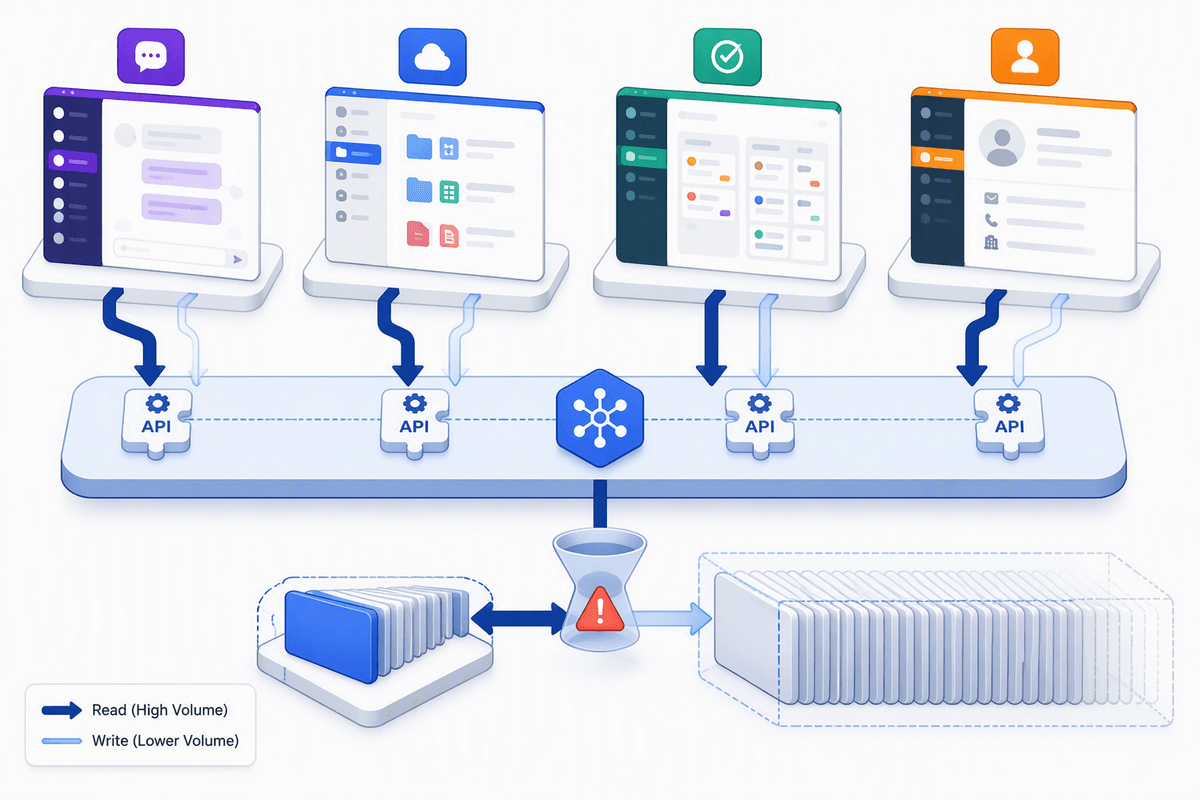
The integration story is where “one agent across many apps” turns from product demo to operational work. Most agents don’t magically understand your tools; they rely on connectors and APIs that expose only parts of an app, with uneven coverage across read vs write actions. One system might support rich search and metadata, while another allows only basic retrieval, so the agent fills gaps with guesses or extra prompts. Even when the connector exists, field mappings, rate limits, and pagination quirks can make “pull the latest” quietly mean “pull the latest 50.”
Automations also break in boring ways: renamed Slack channels, moved Google Drive folders, changed Jira workflows, expired tokens, new approval steps, or a CRM admin tweaking required fields. The cost isn’t just downtime; it’s silent partial failure where the agent completes step three but never finishes step four. Treat every cross-app workflow as a maintained integration: versioned configs, monitored runs, clear fallbacks (log a task instead of sending), and a human owner when the glue fails.
Drawing the line: a practical decision checklist for teams
The moment you trial a cross-app agent, treat it like a new teammate and run a short checklist. What is the single source of truth for each key field (owner, status, next step), and what does the agent do when systems disagree? Which identity does it run as, and can you cap it to read-only or draft-only in the apps that matter most? Where will logs live, and can you replay exactly what it saw and changed? What actions are “confirm-first” (external sends, record updates, deletions), and what is the safe fallback if a connector fails?
If you can’t answer those in one page, keep the agent scoped to suggestion and drafting. The most practical line is simple: let it assemble context and propose changes, but keep irreversible actions behind an approval step until you’ve seen weeks of clean runs—and budget time for ongoing connector maintenance.